
Download Screen Recorder Ultimate – Free Screen Recording Software for Windows, Mac, Android & iOS
Screen Recorder Ultimate is a powerful, user-friendly screen recording tool designed for Windows, Mac, Android, and iOS users. Whether you're creating tutorials, recording online classes, capturing gameplay, or producing content for YouTube, this software delivers high-quality video output with minimal effort. With support for both screen and audio recording, Screen Recorder Ultimate ensures your screencasts are crisp, clear, and professionally polished. Its intuitive interface makes it accessible for beginners, while advanced features like real-time editing, customizable recording areas, and multiple output formats cater to power users. The software is available for free download, with a 30-day trial that unlocks full functionality, allowing you to test all features before deciding on a purchase.
Key Features of Screen Recorder Ultimate
Screen Recorder Ultimate stands out in the crowded market of screen recording tools thanks to its comprehensive feature set. One of the most impressive aspects is its ability to capture both screen activity and audio simultaneously. Whether you're recording a Zoom meeting, a video tutorial, or a live stream, the software ensures perfect synchronization between visuals and sound. It supports multiple audio sources, including system audio, microphone input, and even external devices, giving you full control over your audio mix.
The software also allows you to record specific screen regions or the entire display, making it ideal for focused content creation. You can choose between full-screen, window-specific, or custom rectangle recording modes. For users who want more precision, the built-in screen capture editor lets you trim clips, add subtitles, apply visual effects, and even overlay images or logos directly within the app. This eliminates the need for external video editing software in many cases.
Another standout feature is cross-platform compatibility. Screen Recorder Ultimate supports Windows 10/11, macOS Big Sur and later, Android 8.0+, and iOS 12+. This means you can seamlessly switch between devices without losing workflow continuity. Additionally, the software supports high-definition recording up to 4K resolution, ensuring your videos look sharp on any screen. With options for adjustable frame rates (up to 60fps), bitrate control, and various output formats (MP4, AVI, MOV, WMV), users have full flexibility in optimizing their recordings for different platforms and purposes.
- Record screen and audio simultaneously with high-quality synchronization
- Support for full-screen, window, and custom region recording
- Real-time video editing with trimming, text overlays, and effects
- 4K HD recording with adjustable frame rates and bitrate
- Cross-platform support: Windows, Mac, Android, iOS
- Multiple output formats: MP4, AVI, MOV, WMV
- Free download with 30-day full-featured trial
Easy Installation & Seamless Usage Across Devices
Getting started with Screen Recorder Ultimate is a breeze. The installation process is straightforward and takes less than two minutes on any supported device. After downloading the installer from the official website, simply run the file, accept the license agreement, and follow the on-screen prompts. The software does not require complex configurations or background services, ensuring minimal system impact during recording.
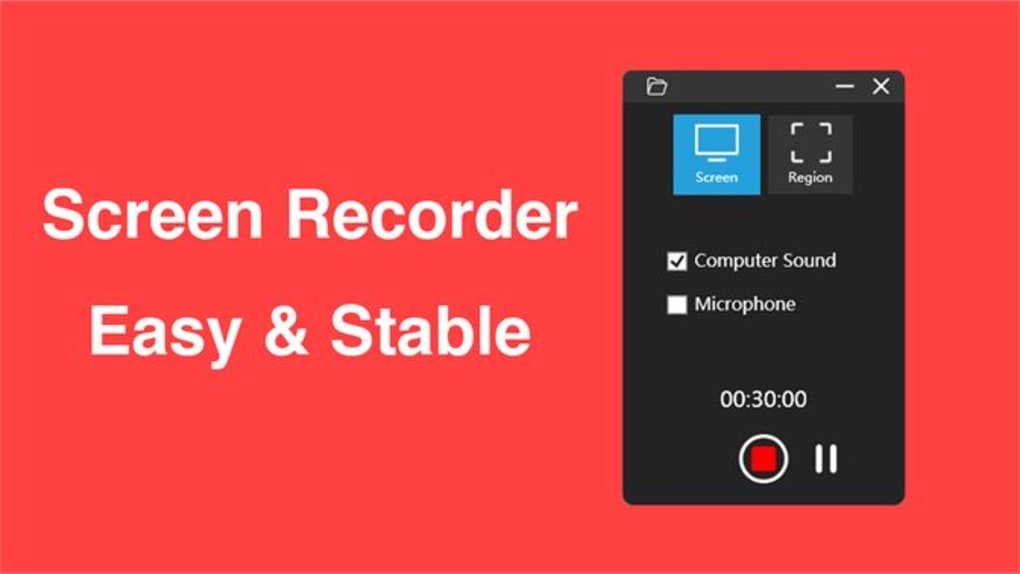
Once installed, the main interface is clean and intuitive. The central recording button is prominently displayed, and you can quickly select your recording mode—full screen, specific window, or custom area—via a simple dropdown menu. You can also toggle audio sources on or off with a single click, making it easy to switch between system audio, microphone, or both. For advanced users, the settings panel allows fine-tuning of recording quality, file size, and output location.
On mobile devices, the app offers a touch-friendly interface that adapts seamlessly to smartphones and tablets. You can start and stop recordings with a tap, and the app automatically saves files to your device’s gallery or cloud storage. The mobile version also includes gesture controls, such as swiping to pause or resume recording, enhancing usability on smaller screens. Whether you're using a desktop or a mobile device, Screen Recorder Ultimate ensures consistent performance and reliable results.
For content creators, the integration with cloud services like Google Drive, Dropbox, and OneDrive makes sharing recordings effortless. After recording, you can directly upload your video to your preferred platform with just a few clicks. This feature is especially useful for remote teams, educators, and influencers who need to distribute content quickly.
Compatibility & System Requirements
Screen Recorder Ultimate is engineered for broad compatibility across modern operating systems. It runs smoothly on Windows 10 and Windows 11, with support for both 32-bit and 64-bit architectures. For Mac users, the software is compatible with macOS Big Sur (11.0) and later versions, including Apple Silicon (M1/M2) Macs, ensuring optimal performance and battery efficiency.
On mobile platforms, the app is available for Android 8.0 and above, making it accessible to most modern smartphones and tablets. For iOS users, Screen Recorder Ultimate supports iPhone and iPad models running iOS 12 or later. The mobile version leverages device-specific APIs to deliver native-level recording quality without compromising system stability.
System requirements are modest, making it suitable for a wide range of devices. On desktops, you’ll need at least 2GB of RAM and 500MB of free disk space. For mobile devices, the app requires minimal storage and operates efficiently even on mid-range smartphones. The software is optimized to minimize CPU and GPU usage during recording, reducing lag and overheating issues—common problems with other screen recording tools.
Additionally, Screen Recorder Ultimate supports a variety of input devices, including webcams, external microphones, and HDMI sources, making it ideal for hybrid recording scenarios such as live streaming with a presenter overlay or recording from a gaming console.
- Windows: 10, 11 (32/64-bit)
- macOS: Big Sur (11.0), Monterey, Ventura, Sonoma
- Android: 8.0 and above
- iOS: 12.0 and above
- 2GB RAM (minimum), 500MB free disk space
- Supports webcams, microphones, HDMI inputs
Pros & Cons: Is Screen Recorder Ultimate Right for You?
Like any software, Screen Recorder Ultimate has its strengths and limitations. Here’s a balanced overview to help you decide if it’s the right fit for your needs.
Pros
- Free to download with a 30-day full trial – No hidden costs during testing
- High-quality 4K recording – Perfect for professional-grade content
- Real-time editing tools – Trim, add text, and apply effects without leaving the app
- Cross-platform support – Use on Windows, Mac, Android, and iOS
- Lightweight and efficient – Minimal impact on system performance
- Multiple audio source options – Record system audio, mic, or both
Cons
- Watermark in free version – Full version required for watermark-free exports
- Advanced features locked in free trial – Some tools only available after purchase
- Mobile app lacks advanced filters – Fewer editing options compared to desktop version
Frequently Asked Questions (FAQ)
Can I record my screen and microphone at the same time?
Yes, Screen Recorder Ultimate allows you to record both your screen and microphone audio simultaneously. You can also choose to record system audio, external audio, or a combination of sources, giving you full control over your recording mix.
Is Screen Recorder Ultimate safe to download?
Absolutely. The software is free from malware and viruses. It is distributed through the official website with secure download links and regular updates to ensure security and performance.
Can I edit my recordings directly in the app?
Yes, Screen Recorder Ultimate includes a built-in video editor. You can trim clips, add text overlays, insert effects, and even add background music—all without needing third-party software.
Does it support 4K recording?
Yes, the software supports recording in up to 4K resolution with adjustable frame rates (up to 60fps), ensuring ultra-high-definition output for professional use.
Is there a mobile version for Android and iOS?
Yes, Screen Recorder Ultimate is available for both Android and iOS devices. The mobile app offers full screen recording with audio and is optimized for touch-based navigation.
Final Verdict: Why You Should Download Screen Recorder Ultimate Today
Screen Recorder Ultimate is one of the most versatile and reliable screen recording tools available today. Whether you're a student, educator, content creator, or professional, this software empowers you to capture high-quality screen activity with ease. Its combination of powerful features, cross-platform compatibility, and a free trial makes it a smart choice for anyone looking to record, edit, and share screen content seamlessly.
While the free version includes a watermark and limits access to advanced tools, the 30-day trial gives you full access to all features—perfect for testing before committing. With its secure download, lightweight design, and real-time editing capabilities, Screen Recorder Ultimate delivers exceptional value.
Ready to record your next video with confidence? Download Screen Recorder Ultimate now and start creating professional-quality screencasts in minutes.
TechReview Pro






